Learn-Redux
Store
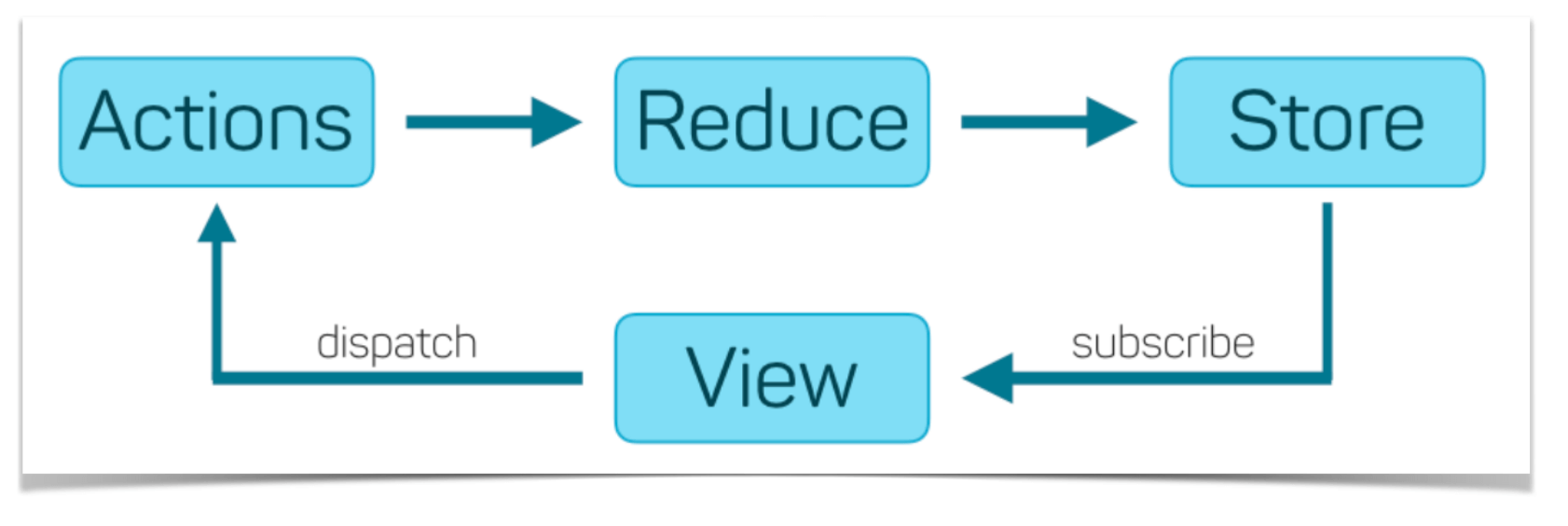
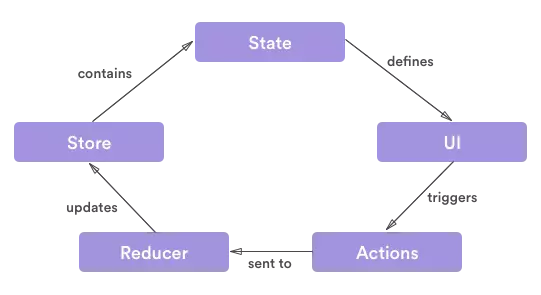
1. Lý thuyết
- Phần này sẽ tạo kho
store. - Trên sơ đồ thấy
Storesẽ chứa cácstate-dữ liệu trạng thái. - Đầu vào của
storesẽ làreducer, xem như reducer là 1callback - Lại có
new statesẽ được tạo từ xử lýreducer, nên ta khai báo như sau:
function createStore(reducer){
 let state = reducer()
 ...
}
- Dữ liệu state của store sẽ được đẩy qua
VIEW VIEWta sẽ xây dựng nên cácComponent-Thành phầnComponent: là các thành phần nhỏ lẻ từng chức năng cấu thành nên 1 giao diện VIEW.ví dụ: Giao diện Todo App như sau:
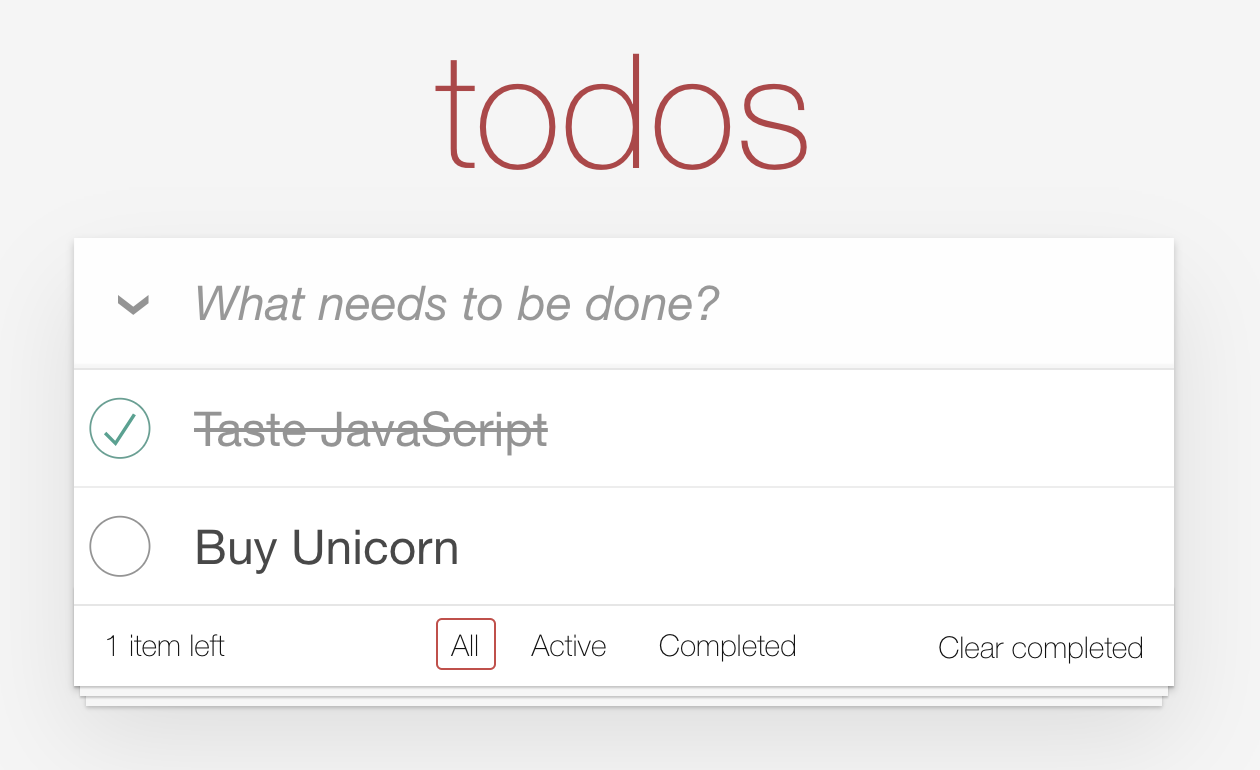
- Thì sẽ bao gồm những Component là:
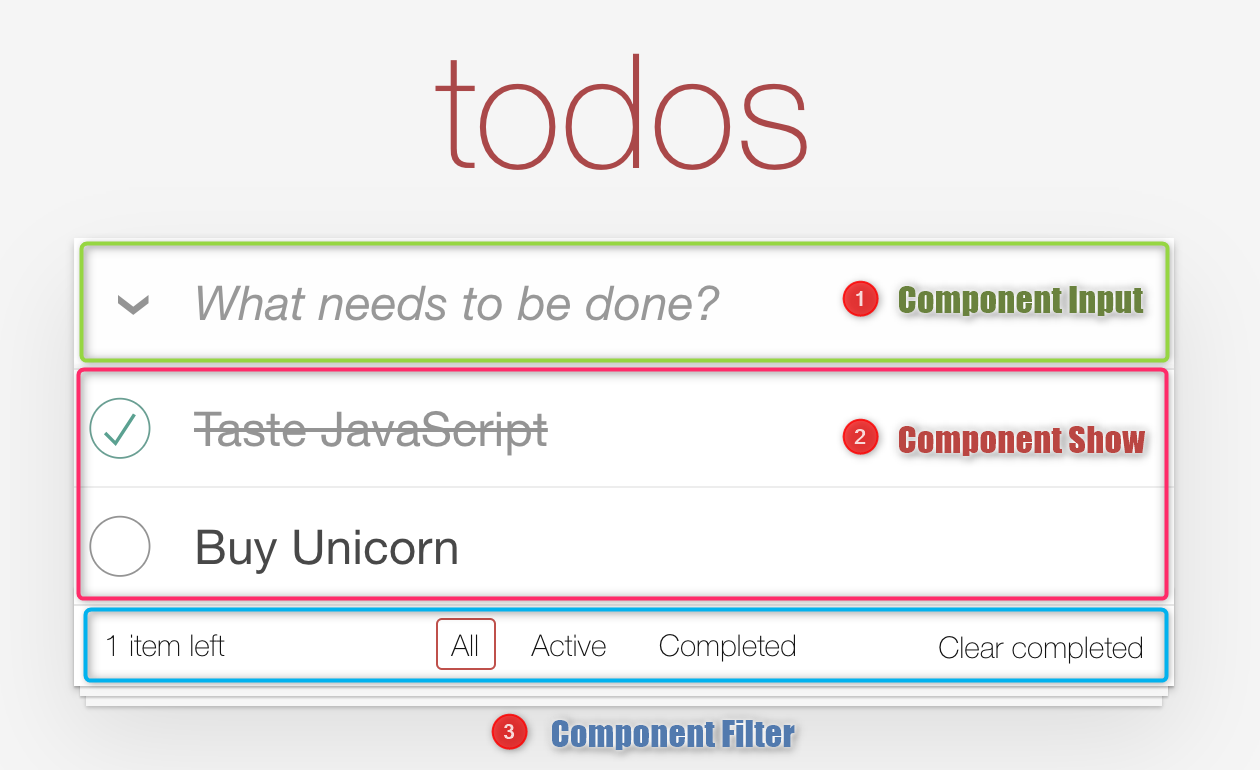
- (1) Component Input: Cập nhật tên
- (2) Component Show: Hiển thị và điều chỉnh trạng thái
-
(3) Component Filter: Lọc các trạng thái
- Khi này xây dựng file
index.htmlphần body sẽ tạo tưng ứng nhữngRootthành phần gốc tương ứng vớiComponentnhư sau:
<!DOCTYPE html>
<html lang="en">
  <head>
    <meta charset="UTF-8" />
    <title>Todo App</title>
    <link rel="stylesheet" href="./css/base.css" />
    <link rel="stylesheet" href="./css/index.css" />
  </head>

  <body>
    <!-- <div id="root"></div> -->
    <section class="todoapp">
      <header class="header">
        <h1>todos</h1>
        <input
          class="new-todo"
          placeholder="What needs to be done?"
          autofocus
        />
      </header>
      <!-- This section should be hidden by default and shown when there are todos -->
      <section class="main">
        <input id="toggle-all" class="toggle-all" type="checkbox" />
        <label for="toggle-all">Mark all as complete</label>
        <ul class="todo-list">
          <!-- These are here just to show the structure of the list items -->
          <!-- List items should get the class `editing` when editing and `completed` when marked as completed -->
          <li class="completed">
            <div class="view">
              <input class="toggle" type="checkbox" checked />
              <label>Taste JavaScript</label>
              <button class="destroy"></button>
            </div>
            <input class="edit" value="Create a TodoMVC template" />
          </li>
          <li>
            <div class="view">
              <input class="toggle" type="checkbox" />
              <label>Buy a unicorn</label>
              <button class="destroy"></button>
            </div>
            <input class="edit" value="Rule the web" />
          </li>
        </ul>
      </section>
      <!-- This footer should be hidden by default and shown when there are todos -->
      <footer class="footer">
        <!-- This should be `0 items left` by default -->
        <span class="todo-count"><strong>0</strong> item left</span>
        <!-- Remove this if you don't implement routing -->
        <ul class="filters">
          <li>
            <a class="selected" href="#/">All</a>
          </li>
          <li>
            <a href="#/active">Active</a>
          </li>
          <li>
            <a href="#/completed">Completed</a>
          </li>
        </ul>
        <!-- Hidden if no completed items are left ↓ -->
        <button class="clear-completed">Clear completed</button>
      </footer>
    </section>
    <!-- Scripts here. Don't remove ↓ -->
    <script type="module" src="./script.js"></script>
  </body>
</html>
2. Mô tả xây dựng
2.1 Hàm createStore
- Tạo hàm tạo Store là
createStore - Trên sơ đồ thấy
Storesẽ chứa cácstate-dữ liệu trạng thái. - Đầu vào của
storesẽ làreducer, xem như reducer là 1callbacksẽ viết sau này để truyền vào. - Lại có
new statesẽ được tạo từ xử lýreducer, nên ta khai báo như sau:
function createStore(reducer){
 let state = reducer()
 ...
}
- Dữ liệu state của store sẽ được đẩy qua
VIEW. - Tạm xem dữ liệu này sẽ được xử lý bởi hàm
htmlđể truyền vào element cóid = "root".
function html([first, ...values], ...strings) {
  return values
    .reduce(
      (acc, cur) => {
        return acc.concat(strings.shift(), cur);
      },
      [first]
    )
    .filter((x) => (x && x !== true) || x === 0)
    .join('');
}
- Element có
id = "root"được gọi là root (Node gốc), và sẽ được render thành chuỗi stringHtml để truyền vào DOM thông qua innerHtml. - Dữ liệu sẽ được xử lý này ta tạm gọi là roots là một đối tượng đặc biệt kiểu Map() (Xem về kiểu dữ liệu Map ) sẽ có dạng:
function createStore(reducer){
 let state = reducer()

  const roots = new Map(); // Ban đầu thì roots sẽ không có dữ liệu
  /**
   * roots : Map(){
   * key : Value
   * div#root : () => `<h1>Hello World!!!</h1>`
   * root: div#root
   * component : () => `<h1>Hello World!!!</h1>`
   * }
   */

  // attach(() => `<h1>Hello World!!!</h1>`, document.getElementById('root'));
  /**
   * roots : Map(1) {div#root => ƒ}
   * {div#root => () => `<h1>Hello World!!!</h1>`}
   * key: div#root
   * value: () => `<h1>Hello World!!!</h1>`
   * [[Prototype]]: Map
   */
 ...
}
- Kiểu dữ liệu Map() sẽ bao gồm 2 thành phần là:
keysẽ làelement rootvaluesẽ là mộthàm componentđể tạo ra được chuỗihtml, ta sẽ gọi là thành phầncomponent.
roots : Map(){
   key : Value
   //Ví dụ: div#root : () => `<h1>Hello World!!!</h1>`
   //Trong đó root: div#root
   //component : () => `<h1>Hello World!!!</h1>`
  }
- Ví dụ có:
Map(){
  // key : Value
  div#root : () => `<h1>Hello World!!!</h1>`
}
Thì:
keysẽ làdiv#rootcomponentsẽ là() => '<h1>Hello World!!!</h1>'
Khi này hàm createStore sẽ là :
function createStore(reducer) {
  let state = reducer();

  const roots = new Map(); // Ban đầu thì roots sẽ không có dữ liệu
}
2.2 Hàm Render
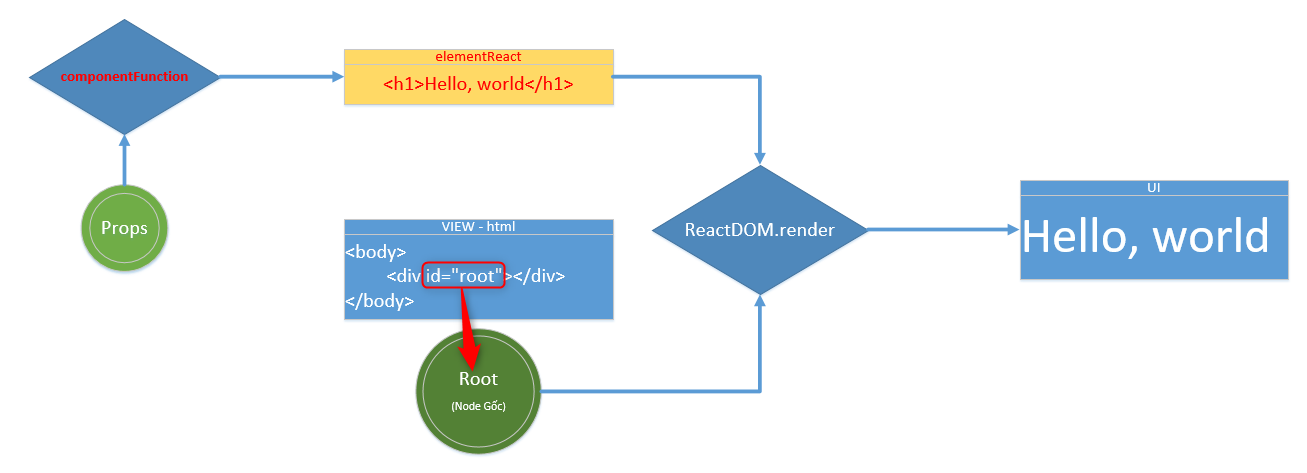
- Lúc này ta cần viết 1 hàm xử lý render dữ liệu từ Biến
rootslưu các gốc Element chuyển thành các component ở View thông qua DOM như sau:
  function render(){
    // Vòng lặp qua roots để chuyển ra VIEW
    for(const [root, component] of roots){
      const output = component(); // Callback html() ra chuỗi
      root.innerHTML = output; // Gán chuỗi html vào element #root để hiển thị
    }
- Ở đây component sẽ là 1 hàm callback xử lý trả về chuỗi root element tương ứng với đối tượng root cần gán.
- Ví dụ: component sẽ là hàm html, và sẽ đưa chuỗi html vào root id.
- Ngoài ra thì có thể là: Đưa xử lý nhập Tên todo-list và lưu lại, sử dụng component là componentInput
Khi này hàm createStore sẽ là :
function createStore(reducer) {
  let state = reducer(); // Sử dụng closure

  const roots = new Map();

  function render(){
    // Vòng lặp qua roots để chuyển ra VIEW
    for(const [root, component] of roots){
      const output = component();
      root.innerHTML = output;
    }
}
2.3 Phương thức attach
- Ban đầu đối tượng roots chưa có dữ liệu, nên cần xây dựng 1 hàm đẩy dữ liệu tương ứng từng component và root vào roots như sau:
const roots = new Map();

function attach(component, root) {
  roots.set(root, component); // Sử dụng method set của đối tượng Map()
  render(); // Sau khi gán xong sẽ render ra view luôn
}
- Khi này hàm
createStoresẽ thành:
function createStore(reducer) {
  let state = reducer(); // Sử dụng closure

  const roots = new Map();

  // Xử lý Render từng hàm component vào root component thành phần tương ứng
  function render(){
    // Vòng lặp qua roots để chuyển ra VIEW
    for(const [root, component] of roots){
      const output = component();
      root.innerHTML = output;
    }

  // Trả về Object gồm các phương thức để xử lý ra View
  return {
    // 1. Phương thức đẩy component và root element tương ứng vào Roots
    attach(component, root){
      roots.set(root,component); // Sử dụng method set của đối tượng Map()
      render(); // Sau khi gán xong sẽ render ra view luôn
    },
    ...
  }
}
2.3 Phương thức connect
- Hàm xử Lý kết nối giữa Store và View thông qua lọc các state và xử lý component, props tương ứng(Lọc các state thích hợp chuyển qua View) –> Cần xem lại chỗ này để hiểu hơn ???
    // let state = reducer();
    function connect(selector = state => state){
      return component => (props, ...args)=>
        component(Object.assign({}, props, selector(state), ...args))
        // Merge các đối tượng vào Object gán vào Object.assign
    },
- Khi này hàm createStore sẽ thành:
function createStore(reducer) {
  let state = reducer(); // Sử dụng closure

  const roots = new Map();

  // Xử lý Render từng hàm component vào root component thành phần tương ứng
  function render(){
    // Vòng lặp qua roots để chuyển ra VIEW
    for(const [root, component] of roots){
      const output = component();
      root.innerHTML = output;
    }

  // Trả về Object gồm các phương thức để xử lý ra View
  return {
    // 1. Phương thức đẩy component và root element tương ứng vào Roots
    attach(component, root){
      roots.set(root,component); // Sử dụng method set của đối tượng Map()
      render(); // Sau khi gán xong sẽ render ra view luôn
    },

    // 2. Lọc các state thích hợp chuyển qua View
    connect(selector = state => state){
      return component => (props, ...args)=>
        component(Object.assign({}, props, selector(state), ...args))
        // Merge các đối tượng vào Object gán vào Object.assign
    },
    ...
  }
}
2.4 Phương thức dispatch
-
Phương thức này sẽ thực hiện xử lý khi thao tác người dùng tác động trên VIEW sẽ đẩy hành động action + state vào reducer.
-
Ở đây xem như thao tác sẽ tác động truyền vào reducer xử lý luôn.
-
reducer: hiểu tương tự như
reducesẽ truyền vào giá trị ban đầu, biến đổi và tạo thành giá trị tích trữ mới.
function dispatch(action, ...args) {
  state = reducer(state, action, args); // reducer xem như callback
  // Tạo state mới từ state cũ, action và các tham số khác.
  // state được thay đổi mới -> store sẽ được update lại, và cần VIEW thay đổi lại.
  render(); // Update lại VIEW
}
- Khi này hàm
createStoresẽ thành:
function createStore(reducer) {
  let state = reducer(); // Sử dụng closure

  const roots = new Map();

  // Xử lý Render từng hàm component vào root component thành phần tương ứng
  function render(){
    // Vòng lặp qua roots để chuyển ra VIEW
    for(const [root, component] of roots){
      const output = component();
      root.innerHTML = output;
    }

  // Trả về Object gồm các phương thức để xử lý ra View
  return {
    // 1. Phương thức đẩy component và root element tương ứng vào Roots
    attach(component, root){
      roots.set(root,component); // Sử dụng method set của đối tượng Map()
      render(); // Sau khi gán xong sẽ render ra view luôn
    },

    // 2. Lọc các state thích hợp chuyển qua View
    connect(selector = state => state){
      return component => (props, ...args)=>
        component(Object.assign({}, props, selector(state), ...args))
        // Merge các đối tượng vào Object gán vào Object.assign
    },

    // 3. Dispatch : Thao tác người dùng tác động trên VIEW sẽ đẩy hành động
    dispatch(action,...args){
      state = reducer(state, action, args);
      render(); // Update lại VIEW
    }
  }
}